

Active installs
2K+
Subscription includes
Support
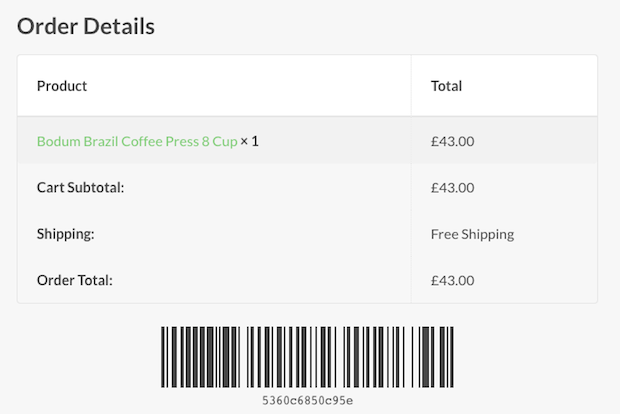
Barcodes can be created as one of five different types (from standard barcodes to QR codes) and can be scanned and processed directly on your site. Customers will receive their barcodes by email so they can be easily printed out where necessary.
Store owners will also be able to view and print out barcodes.
Using the built-in barcode scanner, you can quickly complete orders or check customers in – this allows you to use the barcode as a robust (yet simple) e-ticket solution for any type of event, booking or reservation.
WooCommerce Order Barcodes is an order management extension that generates a unique, scannable barcode for every order placed on your store. Barcodes are created automatically as soon as an order is placed, and they are added to order emails and the customer's account area so shoppers can print them when needed. You can use these barcodes for e-tickets, e-reservations, packing slips, and order tracking, then scan them directly on your site to look up, complete, or check in an order.
Yes. WooCommerce Order Barcodes is designed to work as a straightforward e-ticket solution for events, bookings, and reservations. Each order receives a scannable barcode that customers get by email, and you can scan it at the door to check attendees in or mark orders complete. If you want a full ticketing setup with per-ticket details and attendee information, pair it with WooCommerce Box Office, which generates an individual barcode for each ticket when both extensions are active.
You can scan barcodes directly on your own site using the extension's built-in scanning feature, with no separate scanning service required. It supports standard USB barcode scanners for Code 39, 93, and 128 barcodes, while Data Matrix and QR Code types work with digital scanners and mobile devices. A USB scanner is detected automatically so the action runs without extra clicks, which speeds up scanning tickets at a door or processing orders in a fulfillment area. You can also scan using a smartphone or tablet together with a scanning app of your choice.
Scanning a barcode lets you act on the linked order right away. You can look up the order to view its details, mark the order complete, or check a customer in, all from a scanning page on your site. Actions run without reloading the page, so you can move through a queue of orders or attendees quickly. This makes the barcode useful both for event check-in and for order fulfillment.
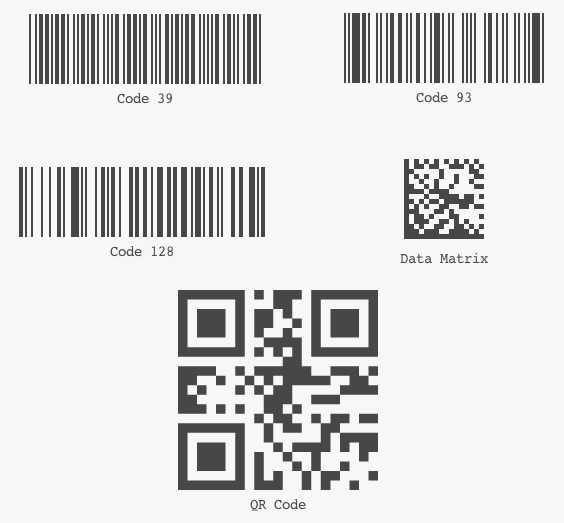
The extension offers five barcode types, ranging from standard barcodes to QR codes: Code 39, Code 93, Code 128, Data Matrix, and QR Code. Code 39, 93, and 128 work with standard USB barcode scanners, while Data Matrix and QR codes work with digital scanners and mobile devices. You choose the type in the settings, and the right choice depends on the scanning hardware you plan to use.
No. WooCommerce Order Barcodes creates a single barcode per order, not one for each item in the order. If you need a separate barcode for each ticket in an order, use it alongside WooCommerce Box Office, which generates individual ticket barcodes when both extensions are active.
Yes. By attaching a unique barcode to every order, the extension gives you tools to retrieve order details with a quick scan instead of manual lookups. Scanning to match products with orders can help reduce shipping mistakes, and attaching barcodes to packages supports clearer order tracking through fulfillment. This can help cut down on manual steps and the errors that come with them.
Yes. Once an order is placed, the barcode is included in the order emails and shown on the order details page in the customer's WooCommerce account area. Customers can print the barcode from there when they need a physical copy, such as a printed ticket or reservation. Store owners can also view and print barcodes from the order screen in the dashboard.
Yes. WooCommerce Order Barcodes integrates with WooCommerce Bookings, so a scannable barcode is attached to booking orders. This lets you check customers in for appointments, classes, tours, or rentals by scanning their barcode, which adds a check-in step to the reservations you already manage with Bookings.
They solve related but different problems. WooCommerce Box Office turns products into tickets and manages event ticketing, including per-ticket holder information. WooCommerce Order Barcodes adds the scannable barcodes and the on-site scanning tools used to check people in or process orders. For a complete event setup, many stores use both: Box Office to sell and manage tickets, and Order Barcodes to generate and scan a barcode for each ticket.
WooCommerce Order Barcodes is built around order-level barcodes, so it may not be the right fit if your main goal is product-level or inventory barcoding across your catalog. If you need to attach barcodes to individual products for stock management, a product-focused barcode extension is likely a better match. If you need full event ticketing with attendee data, consider adding WooCommerce Box Office, and if you need to manage appointments or rentals, look at WooCommerce Bookings.
It is a good fit for stores that need a scannable code tied to each order, such as event organizers selling e-tickets, businesses handling reservations or bookings, and merchants who want faster, more accurate order fulfillment with packing slips and package tracking. It suits store owners who want to sell and scan on their own site rather than relying on a third-party ticketing platform.
Not necessarily. You can scan using a standard USB barcode scanner, or use a smartphone or tablet with a scanning app of your choice. The barcode type you choose should match your hardware: Code 39, 93, and 128 pair with USB scanners, while Data Matrix and QR codes suit digital scanners and mobile devices. Everyday order lookups and printing do not require dedicated equipment.
Yes. Existing orders do not get a barcode automatically, but a unique barcode is created and added to an older order as soon as you open its order page in the dashboard. New orders, including those you create manually in the dashboard, get a barcode as soon as they are placed.
You can build an on-site ticketing flow using WooCommerce extensions instead of an external service. Use WooCommerce Box Office to turn products into tickets and collect attendee details, then add WooCommerce Order Barcodes to generate a scannable barcode for each ticket and check attendees in on your own site. For appointments, classes, or rentals, WooCommerce Bookings pairs with Order Barcodes to add check-in by scan.
Categories
Extension information
Quality Checks
Compatibility
Countries